

Table of Contents
In industrial manufacturing, BOM (Bill of Materials) is a perfect recipe that integrates R&D, purchasing, and production in PCB manufacturing. BOM contains all the raw materials, parts, components, assemblies needed to manufacture an item, and important details like quantities and specs. BOMs act as blueprints for production. Without an accurate BOM, making products efficiently can be super tricky. But when you have a detailed BOM, the whole process is smoother.
What is a BOM (Bill of Materials)?
A Bill of Materials (BOM for short) is an important technical document describing an organization’s product composition. It can be said that the BOM records a specific product parts or formula of raw materials dosage information list. Therefore, it is also known as a product structure table, product structure tree, parts table, product dosage table, composition table, and cost structure table.
In the field of the electronics industry, it indicates the type and quantity of electronic components required for the product, as well as the combination of various components, and the relationship between the circuit design.
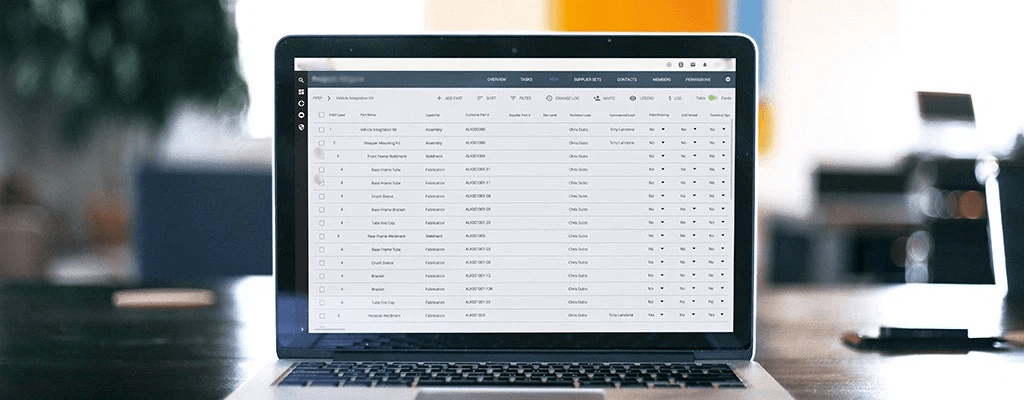
The Role of BOMs in Efficient Manufacturing
For smooth manufacturing operations, having well-defined BOMs is crucial. They ensure the production line has needed materials when required. BOM accuracy helps avoid costly errors and delays. Keeping BOMs updated also aids efficiency by reflecting engineering changes over a product’s lifecycle. Overall, meticulous BOMs are vital for lean, waste-free manufacturing.
How BOMs Enhance Manufacturing Processes
BOMs help manufacturing in several key ways:
- Facilitate purchasing and planning material requirements. With a detailed BOM, manufacturers know exactly what raw materials and components are needed and in what quantities. This aids procurement and inventory management through accurate demand forecasts.
- Estimate costs and control budgets. A BOM provides precise material and component costs for a product. This helps estimate overall production expenses and make informed budgeting decisions.
- Minimize waste and delays. When all needed parts are available when required in the right amounts, manufacturing delays due to shortages are avoided. These reduce wasted time and expenses.
- Improve supply chain visibility. BOMs give complete transparency into the materials and suppliers involved in production. This allows better supply chain planning and coordination.
- Identify and fix problematic parts. If product defects arise, the BOM helps pinpoint faulty components so they can be quickly replaced.
Components of a BOM
A comprehensive bill of materials (BOM) contains various critical elements to provide the full details required for manufacturing. Though BOMs can be formatted in different ways, they generally include:
Part Identifiers
- Part names: A unique name to identify each component or material. Using clear part names makes the BOM easy to navigate.
- Part numbers: A distinct part number assigned to each item. Part numbers allow quick identification. They can be sequential or intelligently convey details.
- Descriptions: Concise details on each part like dimensions, color, function, etc. Descriptions differentiate similar parts.
- Manufacturers: Listing the part manufacturer enables sourcing parts correctly.
Specifications
- Quantity: The amount of each part needed. Accurate quantities are critical for procuring the right materials.
- Unit of measure: The units to quantify parts in, like weight, volume or quantity. Defining units prevents ordering errors.
- Costs: Unit and total costs for budgeting and cost control. Cost visibility aids meeting targets.
- Priority: Indicates critical components for planning purchases. Highlights of items requiring expedited handling.
Structure
- Levels: Shows where a part fits in the assembly hierarchy. Allows navigation between higher and lower levels.
- Phases: The status like “in design” or “in production.” Tracks where parts are in the lifecycle.
- Notes: Supplementary part details or instructions. Notes provide clarifications.
- Alternates: Substitute parts that can replace original ones if unavailable. Allows flexibility.
Other Considerations:Lifecycle tracking, references, revisions, certifications, packaging, etc.
In summary, a robust BOM contains identifiers, specifications, structure, and additional details on parts and materials. Thoroughly compiling this information ensures an accurate manufacturing blueprint.
BOM Structures: Single vs Multi-Level
BOMs can be structured in different ways depending on the product and manufacturing process. The two main structures are single-level and multi-level BOMs.
| Single-Level BOMs | Multi-Level BOMs | |
| Contents | Parts, materials, and components needed *No subassemblies or hierarchy | Product structure Relationships between assemblies and subassemblies |
| Application | Simpler products with few components | Complex products |
| Benefits | Simple to create and understand Provides overall parts list Good for short production processes | Illustrates product structure clearly Allows drilling down into subassemblies Useful for complex products and customization |
| Drawbacks | No hierarchy or subassemblies shown Difficult to trace issues to specific subassemblies | More difficult to set up and manage Can become complicated with deep levels |
Consider the product design, manufacturing process, and production volume when deciding on single vs multi-level BOMs. Simple, low-volume products may only need a single flat BOM. Highly complex or customizable products require multi-level BOMs to manage subassemblies efficiently. Most real-world products lie somewhere in between.
BOM Software
Modern manufacturing software can handle both BOM structures and make it easy to switch views for different purposes. Common BOM management software are PLM, ERP, MES software and so on.
Types of BOMs
It pays dividends to invest in solutions that simplify and automate component purchasing workflows. PCB ERP systems seamlessly integrate with supplier databases to provide real-time parts pricing and availability data. This enables informed procurement decisions while eliminating manual processes prone to human error. ERP tools also facilitate inventory tracking, bill of materials management, and other tasks to smooth overall operations.

Engineering BOM
Engineering BOMs (EBOMs) define the product design and list parts specified by engineering. EBOMs are often tied to CAD drawings and contain technical specifications.
Uses:
- Detailed design representation
- Basis for manufacturing process planning
Manufacturing BOM
Manufacturing BOMs (MBOMs) list all parts, materials, and instructions to manufacture finished products ready for delivery. MBOMs facilitate production scheduling, purchasing, and inventory management.
Uses:
- Production planning and execution
- Materials/inventory coordination
- Component processing details
Sales BOM
Sales BOMs (SBOMs) help build products to meet custom customer orders. They define parts and configuration options needed to fulfil specific sales orders.
Uses:
- Building customized orders
- Order entry configuration
- Tracking finished goods sales
Other BOM Types
Additional types include production, assembly, configurable, and template BOMs for specific purposes.
How to Create a BOM
Creating an effective bill of materials (BOM) is crucial for manufacturing products efficiently. Follow these key steps:
Determine the Product
First, clearly define the product you are building. Consider any variations that may require different materials or quantities. Identify the product uniquely in your system.
List All Components
Make a comprehensive list of every raw material, part, and component needed. For subassemblies, create separate BOMs. An exploded BOM shows all materials across subassemblies.
Assign Part Numbers
Give unique part numbers or SKUs to all components to enable inventory tracking. Intelligent numbers like “BTN-BLUE” for a blue button help identify parts.
Specify Quantities
Determine the precise quantity of each component required per unit or batch. Allow for waste by adding a margin like 15%.
Calculate Costs
Determine the unit cost for each material by contacting suppliers. Add estimated labor costs for any assembly required.
Review and Update
Review the BOM regularly and update it as the product changes. Ensure everyone references the latest version.
You can watch the video for a reference:
Conclusion
In today’s fast-paced manufacturing landscape, a well-structured Bill of Materials (BOM) is no longer optional—it’s the backbone of operational success. A meticulously managed BOM list streamlines procurement, reduces costly errors, and bridges the gap between design innovation and production efficiency.
Ready to transform workflows? Contact ELE PCB’s BOM experts for suggestions now.
A1: EBOM (Engineering BOM) reflects design specs, while MBOM (Manufacturing BOM) includes production-specific details like assembly sequences and process instructions.
A2: Update BOMs with every design change, supplier shift, or process improvement. Automate revisions via PLM/ERP integration to avoid version conflicts.
A3: Single-level BOMs work best for simple, low-volume builds. Multi-level BOMs are ideal for complex, customizable PCB designs.
A4: Prioritize real-time collaboration, revision tracking, ERP/MES integration, and supplier database sync. Request a free trial to test usability.


CONTACT US






 English
  Italian
  Hungarian